
IPSec Security Associations & ESP — Visual Explainer
The moving parts of IPSec — Security Associations, the SAD and the ESP protocol — laid out as one diagram instead of a wall of definitions.
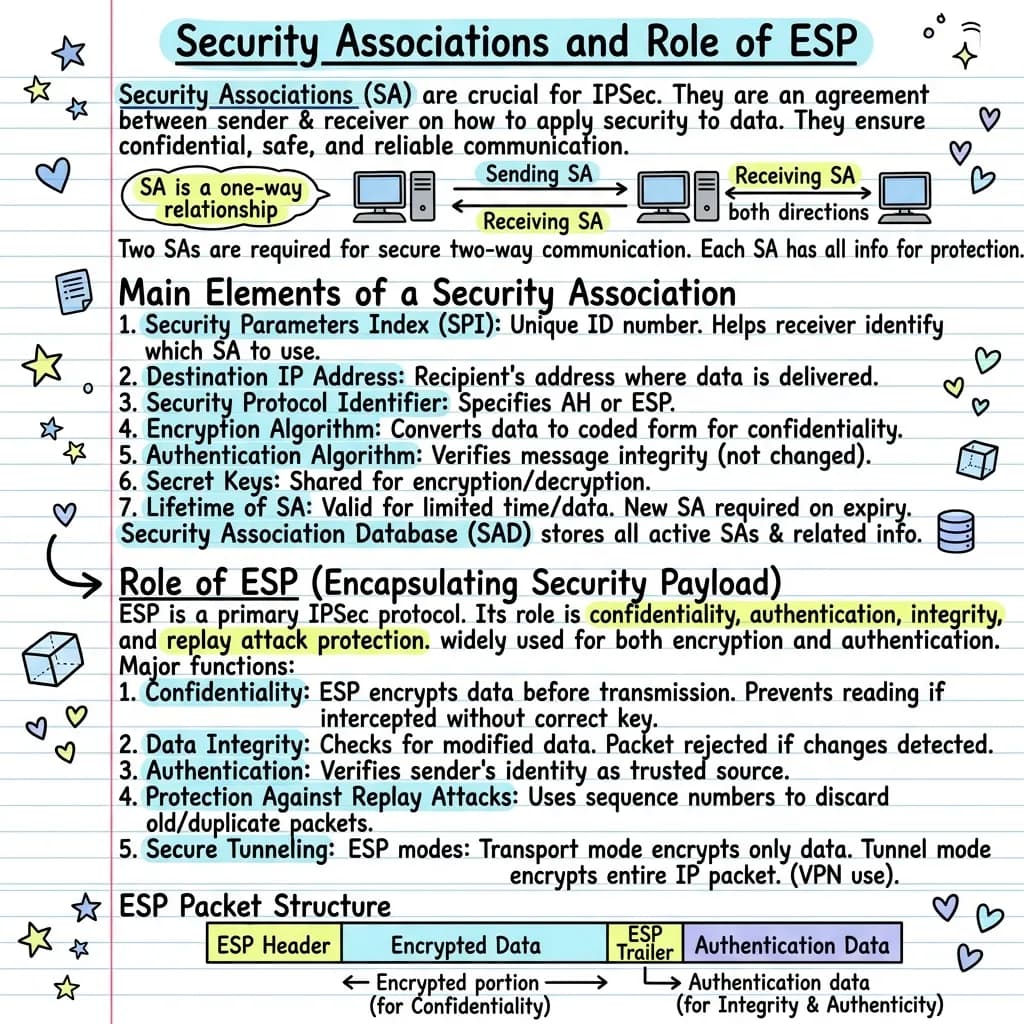
Security Associations are an important part of IP Security. A Security Association is an agreement between sender and receiver about how security services are applied to transmitted data. An SA is a one-way relationship, so two-way secure communication needs two SAs, one for each direction. The main elements of an SA are the Security Parameters Index, destination IP address, security protocol identifier, encryption algorithm, authentication algorithm, secret keys and lifetime. SAs are stored in the Security Association Database. ESP, the Encapsulating Security Payload, is one of the two IPSec protocols. It provides confidentiality, data integrity, authentication, protection against replay attacks and secure tunnelling. ESP works in transport mode and tunnel mode, and an ESP packet contains a header, encrypted data, a trailer and authentication data.
What's in this visual
IPSec is a staple of every networking and security syllabus, and it is unusually hard to revise from notes — Security Associations, the SAD and ESP are a set of moving parts that only make sense together. The diagram above takes the same content and lays it out as a system: who agrees what, where it is stored, and what ESP actually does to a packet. Here is the full breakdown.
What a Security Association is
A Security Association (SA) is the foundation of IPSec: it is an agreement between two devices about exactly how security will be applied to the data they exchange — which protocol, which algorithms, which keys. The critical detail, and a common exam point, is that an SA is a one-way relationship. It protects traffic in a single direction only, so two hosts that want a secure conversation in both directions need two separate SAs — one for sending and one for receiving. Each SA carries everything needed to protect its half of the connection.
The seven elements of a Security Association
An SA is defined by seven elements, and listing them is a frequent question. The Security Parameters Index (SPI) is a unique identifier that lets the receiver pick the right SA for an incoming packet. The destination IP address names the receiving system. The security protocol identifier states whether AH or ESP is in use. The encryption algorithm and authentication algorithm define how data is scrambled and verified. Secret keys are shared for encryption and decryption, and the lifetime caps how long — or how much data — an SA stays valid before it must be renewed.
The Security Association Database (SAD)
A single host can hold many SAs at once — one per direction, per peer, per protocol — so they need to be stored and looked up efficiently. IPSec keeps them all in the Security Association Database (SAD), which maintains every active association together with its security parameters. When a protected packet arrives, the device reads the SPI from the packet, finds the matching entry in the SAD, and applies exactly the algorithms and keys that entry specifies. The SAD is what turns a list of abstract agreements into something the system can act on in real time.
The role of ESP — Encapsulating Security Payload
ESP (Encapsulating Security Payload) is one of the two IPSec protocols, and the one most widely deployed because it does the most. It provides confidentiality by encrypting the data so intercepted packets are unreadable; data integrity, rejecting any packet altered in transit; authentication, confirming the packet came from a trusted sender; and anti-replay protection, using sequence numbers to discard captured packets that an attacker retransmits. An ESP packet is built from an ESP header, the encrypted data, an ESP trailer and authentication data — the encrypted portion delivering secrecy, the authentication data delivering integrity and authenticity.
Transport mode vs tunnel mode
ESP can operate in two modes, and the difference is simply how much of the packet it protects. In transport mode, only the data portion — the payload — is encrypted, while the original IP header stays visible; it is typically used for end-to-end communication between two hosts. In tunnel mode, the entire original IP packet is encrypted and wrapped inside a new packet, hiding the internal addressing completely. Tunnel mode is the basis of Virtual Private Networks (VPNs), which is why this contrast is worth fixing visually rather than memorising as two near-identical sentences.
Why networking topics click faster as diagrams
IPSec is really a chain of dependencies: an SPI points into the SAD, the SAD entry supplies the algorithms, those algorithms build the ESP packet, and the mode decides how much of that packet is wrapped. Prose forces you to hold every link in working memory at once. A diagram makes the chain physical — you can trace your finger from packet to database to mode and watch each step hand off to the next. That traceability is the difference between recognising the terms and being able to explain how a protected packet is actually processed.
For teachers
The problem
- IPSec spans Security Associations, the SAD and ESP — abstract, invisible concepts that resist a clear board sketch.
- Students memorise the seven SA elements as a flat list and miss how the SPI ties a packet to its database entry.
- Transport mode and tunnel mode read almost identically in notes, so the class confuses the two every year.
How to use it in class
- Set it as the recap slide when the IPSec unit ends, so the whole topic lands on one page.
- Project it and trace a single packet from its SPI through the SAD to the ESP processing.
- Use the mode panel to contrast transport and tunnel mode side by side instead of as two paragraphs.
- Blank the seven SA elements to turn the diagram into a quick recall exercise.
For students & visual learners
The problem
- The acronyms — SPI, SAD, ESP, AH — are easy to swap, and one wrong label can sink a whole exam answer.
- You can recite the seven SA elements but cannot explain why a single connection needs two separate SAs.
- Tracing a packet from its SPI to the matching SAD entry feels like a step you skip rather than understand.
How to use it to study
- Revise the whole IPSec topic in one glance instead of re-reading a long chapter.
- Use the diagram to fix why an SA is one-way and why two are needed for two-way traffic.
- Follow the packet path so the SPI-to-SAD lookup finally makes sense.
- Keep it open while you answer past papers so transport and tunnel mode stay distinct.
Make your own visual like this
Paste your notes or upload a PDF
Drop in your own class notes, a textbook chapter or a PDF. Any subject, any language.
Pick a visual style
Choose a sketchnote, infographic or diagram style that fits the topic.
Generate and download
In about 15–40 seconds you get a one-page visual you can print, share or revise from.
Frequently asked questions
What is a Security Association in IPSec?
A Security Association is an agreement between two devices about how security services are applied to the data they exchange — the protocol, algorithms and keys. It is a one-way relationship, so secure two-way communication needs two SAs, one for each direction.
What does ESP provide?
The Encapsulating Security Payload provides confidentiality through encryption, data integrity, authentication of the sender, and protection against replay attacks using sequence numbers. It can also operate in tunnel mode to secure an entire packet, which is how VPNs work.
What is the difference between transport mode and tunnel mode?
In transport mode, ESP encrypts only the data payload and leaves the original IP header visible. In tunnel mode it encrypts the entire IP packet inside a new one, which is the basis of VPNs. You can turn networking notes like these into a diagram with VisualNote AI.
More visual examples
Turn your notes into a visual
Paste any notes or upload a PDF and get a sketchnote-style visual in under a minute.